
GUIDE
How to read a counted cross-stitch chart
A counted cross-stitch chart is a grid where each square stands for one full cross on your fabric. A symbol tells you which thread colour to use, a key turns each symbol into a DMC code, and bold lines every 10 squares help you keep count. Arrows on the edges mark the centre, and larger designs are split into numbered sections across several pages. This guide walks through each part with real Stitchplot charts, so you know where to start on any counted pattern.
What a counted chart shows
The chart is a map of your fabric. Each square is one full cross stitch, its symbol tells you the colour, and a blank square stays bare fabric.
Unlike stamped kits, nothing is printed on the cloth: you count holes on plain Aida or evenweave to place each stitch. New to the craft? Benefits of counted cross-stitch for beginners explains why that grid helps.
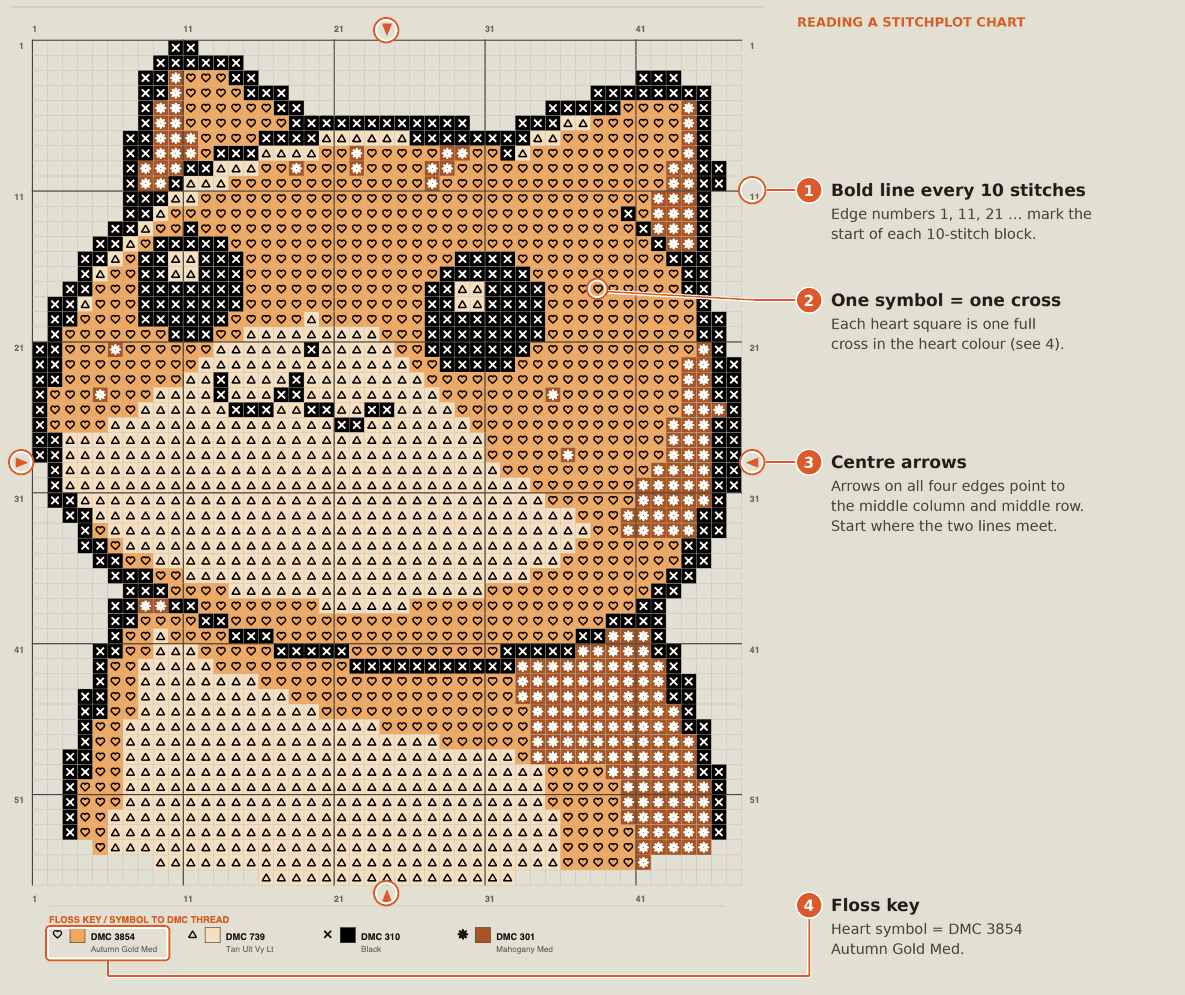
Rows and columns are numbered along the edges, so you can name any square exactly, such as column 21, row 11, and find your place again after a break.
Match each symbol to the floss key
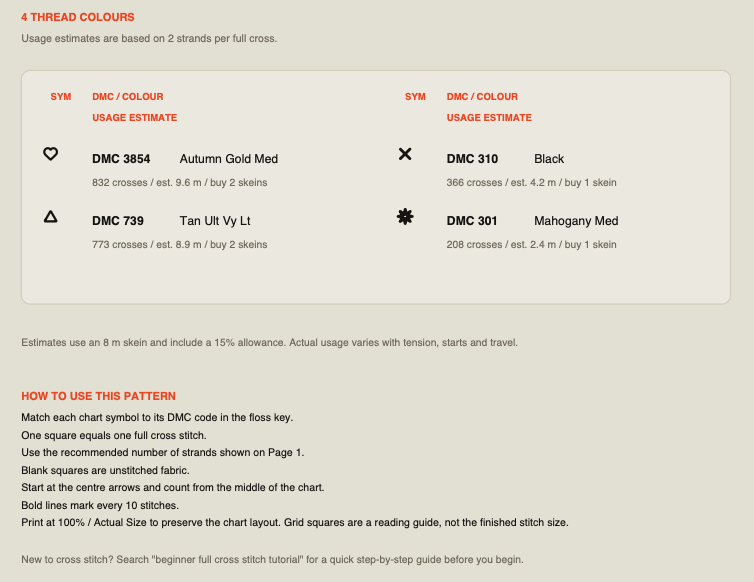
Every colour on the chart has its own symbol, and the floss key lists each symbol with its DMC code and colour name. In the orange cat sample chart from a Stitchplot PDF, the key shows four thread colours:
- Heart: DMC 3854 Autumn Gold Med
- Triangle: DMC 739 Tan Ult Vy Lt
- ×: DMC 310 Black
- Star: DMC 301 Mahogany Med
Stitchplot PDFs include a colour chart and a black-and-white chart. The black-and-white version shows the same symbols on a plain grid, which some people find easier to read. Use whichever suits you; the symbols never change.
Each key line also lists the colour's cross count, estimated thread length and skeins to buy; What's in a Stitchplot print-ready PDF covers the rest of the file. Buy thread by DMC code, not by how a colour looks on screen. Picking colours? See choosing DMC colours.
Find the centre and choose where to start
Arrows on the chart edges point to the middle row and middle column. Where those two lines meet is the centre of the design.
To find the centre of your fabric, fold it in half both ways; the creases cross at the middle.
Many stitchers start there and count outward, which keeps an even margin all round. Starting from a top corner can feel simpler, but an early miscount can push the whole design off centre. Stitchplot's own instructions say to start at the centre arrows.
Before the first stitch, check the strand count on page 1. The orange cat sample uses 2 strands on 14ct Aida (example only; your chart shows its own numbers).
Count with the 10-stitch grid
Bold lines run across the chart every 10 stitches. The numbers along the edges (1, 11, 21, 31 and so on) mark the start of each 10-stitch block.
Count in blocks of 10 rather than square by square, and recount from the nearest bold line before starting a new colour area. A miscount usually shows when your stitches reach the next bold line, so unpick early while the fix is small.
Some stitchers also mark every 10th hole on the fabric with a water-soluble pen or tacking thread, which speeds up counting on larger pieces.
Follow a chart across several pages
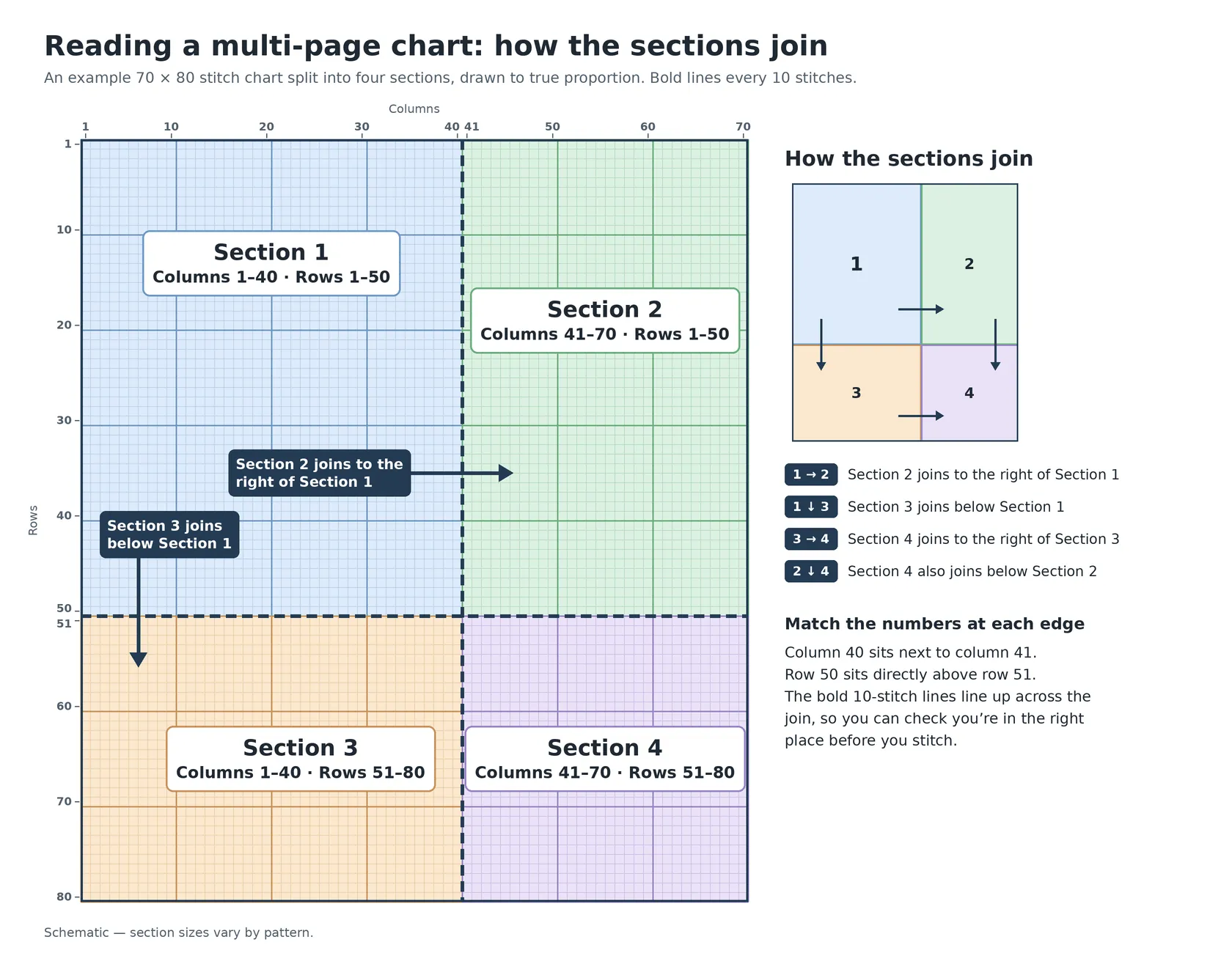
Bigger charts are split into sections so each page stays readable. Here is an example 70 × 80 chart split into four sections (illustrative only; section sizes vary by pattern):
- Section 1: columns 1–40, rows 1–50
- Section 2: columns 41–70, rows 1–50
- Section 3: columns 1–40, rows 51–80
- Section 4: columns 41–70, rows 51–80
Each section header gives its column and row ranges, and sections 2 to 4 carry a "Continues from section…" note showing the reading order. The ranges tell you which edges meet: section 2 sits right of section 1, and section 3 sits below it. In a Stitchplot PDF, the black-and-white chart repeats the same sections.
Lay the printed pages out side by side, or tape matching edges together.
Print at 100% and check the finished size
Print at 100% or Actual Size so the layout doesn't shift. The squares on paper are a reading guide, not your stitch size.
Finished size is stitches ÷ fabric count: 47 stitches on 14ct is about 3.4 in, matching the 3.36 in on the orange cat project sheet. For other counts and centimetres, use Cross-stitch fabric count and finished size.
A quick check before your first stitch
| Check | Where to find it | Why it matters |
|---|---|---|
| Fabric and count | Project sheet (page 1) | The same chart finishes larger on 14ct than on 18ct |
| Strands | Project sheet (page 1) | Coverage depends on strand count for your fabric |
| Symbols ↔ DMC codes | Floss key | One symbol = one colour; buy by code |
| Centre | Arrows on the chart edges | Keeps the design centred on your fabric |
| Section order | Section headers and "continues from" notes | Stops you stitching a page in the wrong place |
| Print scale | Printer dialog: 100% / Actual Size | Keeps the grid readable and pages aligned |
Then mark off squares on a printed copy with a pencil or highlighter as you go, so you always know where you stopped.
FAQ
Where do I start on a cross-stitch chart?
Most stitchers start at the centre. Find it where the edge arrows meet on the chart, fold your fabric in half both ways to find its middle, and count outward from there.
What do the bold lines on a cross-stitch chart mean?
They mark every 10 stitches. Counting in blocks of 10 is quicker than counting single squares, and a stitch on the wrong side of a bold line flags a miscount early.
What does a blank square mean?
A blank square is unstitched fabric. Leave it empty and let the bare cloth show through as part of the design, then move to the next square with a symbol.
Should I use the colour chart or the black-and-white chart?
Either works because the symbols are identical. The colour chart helps you see shapes at a glance; the black-and-white chart can be easier to read up close and uses less ink.
What about backstitch lines, half stitches or French knots?
Charts from other designers may use lines for backstitch and small or split symbols for fractional stitches and French knots. Stitchplot charts use full crosses only, so you won't see those on them.
Make a chart you can read at the hoop
Want a chart from your own photo? Stitchplot builds one in your browser, on 11–36ct fabric with up to 10 DMC colours. The editable SVG is free; print-ready PDFs use credits, with no subscription. Open Studio, or see How it works and What's in a Stitchplot print-ready PDF.