
GUIDE
How to choose DMC colours for a counted cross-stitch chart
Most first charts look better with fewer colours than you'd expect. In Stitchplot's counted cross-stitch (CT) mode you choose a colour count from 1 to 10, and each chart colour is matched to the nearest DMC thread code, so the floss key doubles as a shopping list. Fewer colours give a bolder chart with fewer thread changes; more colours keep detail but add skeins and scattered single stitches. This isn't a full DMC colour chart. It's a guide to picking how many colours to use, checking the key and allowing for screen-to-floss differences.
How Stitchplot matches your image to DMC colours
You pick a colour count from 1 to 10, and the chart uses up to that many colours. Stitchplot reduces your image to a small set of chart colours and matches each one to the nearest DMC code. Every colour gets its own symbol, and the PDF's floss key lists the DMC code and colour name next to each symbol.
Because the number of colours is limited, similar shades in your photo can end up as a single DMC colour. A tan ear and a slightly darker tan cheek may become one thread. At low colour counts that is expected, and it is often what makes a chart easier to stitch.
How many colours does your chart need?
There is no single right number, but the kind of image you start with is a good guide. Use these as starting points, not rules:
| What you're charting | Start with | Why |
|---|---|---|
| Logo, lettering, simple icon | 2–4 colours | Flat shapes; extra colours add noise, not detail |
| Cartoon, pet illustration, bold drawing | 4–6 colours | Outline + main fills + one shade |
| Photo portrait (pet or person) | 6–10 colours | Needs shading steps; expect to edit |
| First project of any kind | 3–8 colours | Same band as the beginner checklist in the benefits article |
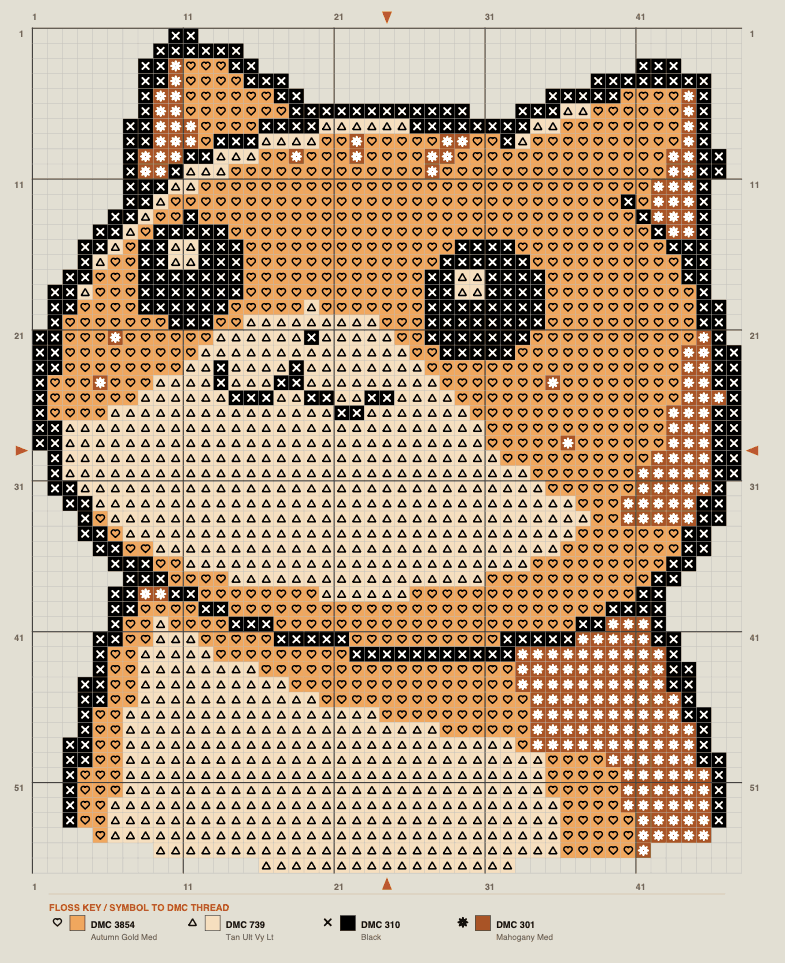
The orange cat sample from a Stitchplot PDF is a bold pet illustration, and 4 colours cover it: a black outline, two main fills and one darker shade (example only; your chart shows its own numbers). For the beginner checklist, see Benefits of counted cross-stitch for beginners.
Fewer colours or more: the trade-off
Fewer colours make a bolder chart. You change thread less often, buy fewer skeins, and the symbols are easier to tell apart on the page. The finished piece tends to read clearly from across the room.
More colours give smoother shading, especially on faces and fur. The cost is more scattered single stitches of one colour surrounded by others, sometimes called confetti. Each of those means another thread start and finish, and the skein list grows.
A simple test helps: convert the same image at two counts, such as 4 and 8, and compare them up close. If the extra colours don't add anything you would miss on fabric, keep the lower count.
Check the floss key before you buy
The floss key lists each colour's symbol, DMC code, colour name, cross count, estimated metres and how many skeins to buy. Read the cross counts before you shop. New to reading the key? See How to read a counted cross-stitch chart.
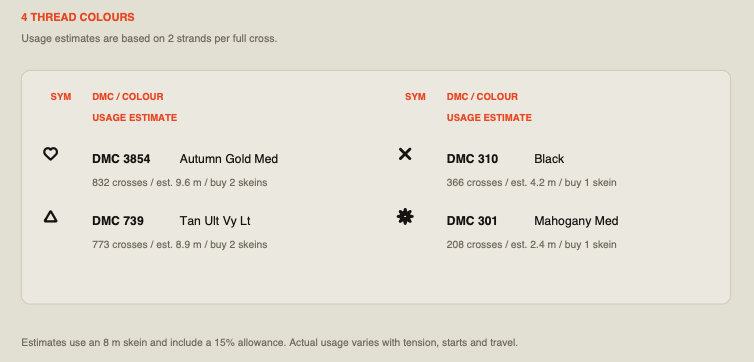
In the orange cat sample (example only; your chart shows its own numbers), the four colours are:
- DMC 3854 Autumn Gold Med: 832 crosses, buy 2 skeins
- DMC 739 Tan Ult Vy Lt: 773 crosses, buy 2 skeins
- DMC 310 Black: 366 crosses, buy 1 skein
- DMC 301 Mahogany Med: 208 crosses, buy 1 skein
DMC 301 is the smallest colour at 208 crosses, about 2.4 m of thread, yet it still needs its own skein. Ask whether each colour earns its place: here the mahogany patches give the cat its markings, so it stays, while a few stray specks of a near-duplicate shade probably wouldn't. To drop one, lower the colour count, or recolour the stray stitches by hand.
Thread estimates assume 2 strands per full cross, an 8 m skein and about a 15% allowance. Tension, starts and finishes vary, so buy a little extra for your heaviest colours. For the rest of the file, see What's in a Stitchplot print-ready PDF.
Screen colours vs real floss
No two screens show colour quite the same way, so the shades on your monitor are only a guide. The fabric changes how thread reads too, and dye lots can vary slightly between skeins.
Buy by DMC code, not by eye. If colour really matters for a piece, compare the codes against a physical DMC colour card or real skeins in daylight. When two colours sit close together, stitch a few crosses of each side by side on a scrap of your fabric before you commit.
Adjusting colours after the first conversion
Your first conversion is a starting point. If shades have merged that you wanted to keep, raise the colour count and compare again. If the chart looks busy, lower it.
In Studio, you can swap a colour for another DMC colour, searching by code or name, with close matches suggested. The pencil recolours single squares, which is the quickest way to tidy stray single stitches or fix a small area. After any edit, check the floss key in your new PDF, because cross counts and skein numbers change with the chart.
FAQ
How many colours should a beginner cross-stitch chart have?
Somewhere between 3 and 8 colours is a comfortable range for a first project. It keeps symbols easy to tell apart and thread changes manageable. Stitchplot lets you go up to 10 when an image needs more shading.
Why did two colours in my photo become one DMC colour?
A low colour count groups similar shades together and matches each group to one DMC code. Raise the colour count to separate them, or edit the stitches by hand where the difference matters.
Why does my floss look different from the chart on screen?
Displays, fabric colour and dye lots all change how a colour looks. Buy thread by its DMC code, and check against a real DMC colour card or skeins in daylight when the exact shade matters.
Can I use more than 10 colours?
Not in Stitchplot's CT mode, where 10 is the maximum. If an image needs more, simplify it, crop tighter around the subject, or accept slightly softer shading.
Can I stitch it with another floss brand?
Stitchplot matches colours to DMC codes only. If you prefer another brand, use that brand's own DMC conversion chart and check the colours in person, since conversions are approximate.
Try a colour count in Studio
Open Studio, convert your image at two colour counts, and check the DMC colour list before you choose. The editable SVG is free; print-ready PDFs use credits, with 3 free when you sign in with Google and no subscription. For where the colour control sits, read Meet Stitchplot Studio.