
GUIDE
Cross-stitch fabric count and finished size
Fabric count is how many stitches fit in one inch of Aida or evenweave. A 14ct fabric puts 14 stitches per inch; 18ct puts 18. The same chart (same stitch width × height) finishes smaller on higher count and larger on lower count. Stitchplot’s CT mode lets you choose fabric counts from 11–36ct, then shows finished size and fabric cut size with margin before you export. Creating, editing, and SVG export are free; a print-ready PDF uses credits. This page is a size reference — not a full Studio tour and not a stitch-pattern gallery.
What fabric count means
Fabric count is stitches per inch on Aida or evenweave. On 14ct, you stitch 14 full crosses in each inch of fabric. On 18ct, you stitch 18 in the same inch.
Lower count means larger stitches and a bigger finished piece. Many beginners like 14ct because the holes are easier to see. Higher count means a finer look and a smaller finished piece for the same stitch grid — more stitches per centimetre, more detail in a tighter space.
Stitchplot supports 11–36ct in CT mode. The tables below spotlight the counts beginners use most (14 / 16 / 18), with a few higher counts for comparison. Width and height are independent: a wide chart stays wide on every count.
Finished size from stitch count
Use this formula for every worked number on this page:
- Finished width (inches) = stitch width ÷ fabric count
- Finished height (inches) = stitch height ÷ fabric count
- Centimetres = inches × 2.54 (rounded to one decimal place)
Quick reference — how far 10 and 100 stitches span on common counts:
| Count | Size of 10 stitches | Size of 100 stitches |
|---|---|---|
| 11ct | 0.91 in / 2.3 cm | 9.1 in / 23.1 cm |
| 14ct | 0.71 in / 1.8 cm | 7.1 in / 18.1 cm |
| 16ct | 0.63 in / 1.6 cm | 6.2 in / 15.9 cm |
| 18ct | 0.56 in / 1.4 cm | 5.6 in / 14.1 cm |
| 22ct | 0.45 in / 1.2 cm | 4.5 in / 11.5 cm |
| 28ct | 0.36 in / 0.9 cm | 3.6 in / 9.1 cm |
If your chart is 80 stitches wide on 14ct, finished width is 80 ÷ 14 ≈ 5.7 in (about 14.5 cm). Scale the same way for height.
Worked example (same chart, three counts)
Locked example chart: 100 × 120 stitches (width × height). Same grid, different fabric counts:
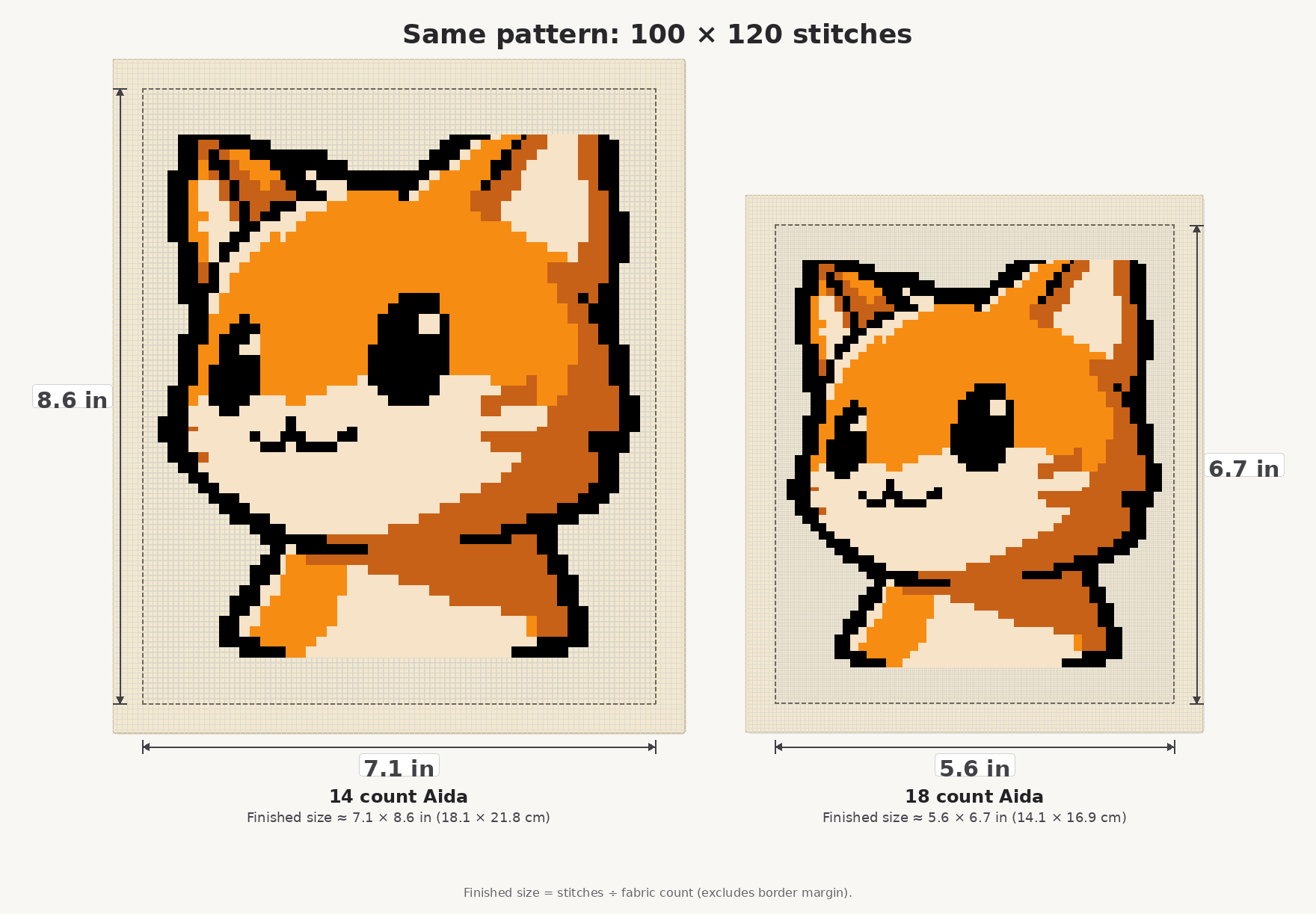
| Count | Finished (in) | Finished (cm) | Cut with 3 in margin (in) | Cut (cm) |
|---|---|---|---|---|
| 11ct | 9.1 × 10.9 | 23.1 × 27.7 | 15.1 × 16.9 | 38.3 × 42.9 |
| 14ct | 7.1 × 8.6 | 18.1 × 21.8 | 13.1 × 14.6 | 33.3 × 37.0 |
| 16ct | 6.2 × 7.5 | 15.9 × 19.1 | 12.2 × 13.5 | 31.1 × 34.3 |
| 18ct | 5.6 × 6.7 | 14.1 × 16.9 | 11.6 × 12.7 | 29.4 × 32.1 |
Takeaway: the same 100 × 120 chart finishes about 7.1 × 8.6 in on 14ct and about 5.6 × 6.7 in on 18ct. Higher count shrinks the physical piece; lower count grows it. Pick the count that fits the hoop or frame you already own.
Fabric cut size with margin
Finished size is the stitched area. Cut fabric is larger because you need spare cloth for the hoop, framing, or hemming.
Default example on this page: 3 in (7.6 cm) margin on each side. That adds 6 in (15.2 cm) to each finished dimension. Makers often prefer 2–4 in each side — use more if you mount loosely, less if fabric is scarce.
Example check (14ct row above): finished 7.1 × 8.6 in + 6 in → cut 13.1 × 14.6 in. Stitchplot’s Studio readout and print-ready PDF project sheet show cut size with margin so you can buy cloth before you stitch.
How Stitchplot shows this
In Studio CT mode, pick a fabric count from 11–36ct. The live panel shows finished size and cut size with margin as you change count, width, height, and ratio. Creating, editing, and editable SVG export are free. Print-ready PDF unlocks with account credits (no subscription). CT patterns use up to 10 DMC-matched colours.
For the full control strip and editing tools, read Meet Stitchplot Studio. For what sits inside the unlock file (project sheet, DMC key, tiled charts), read What’s in a Stitchplot print-ready PDF — this size guide does not repeat that inventory. For the short make-a-chart path, see How it works.
FAQ
What does 14 count mean?
14ct means 14 stitches per inch of fabric. Ten stitches span about 0.71 in (1.8 cm) on 14ct.
Will my design look smaller on 18ct?
Yes. The stitch grid stays the same, but each stitch is smaller, so the finished piece is smaller — for example 5.6 × 6.7 in on 18ct versus 7.1 × 8.6 in on 14ct for a 100 × 120 chart.
How do I calculate finished size myself?
Divide stitch width by fabric count for inches; do the same for height. Multiply inches by 2.54 for centimetres. Or open Studio and read the live finished-size panel.
What margin should I add when cutting fabric?
This page uses 3 in (7.6 cm) each side as the default example (6 in / 15.2 cm added to each dimension). Many stitchers use 2–4 in. Match the margin to how you hoop and finish.
Where does Stitchplot show finished size?
In Studio CT mode after you set fabric count, and again on the print-ready PDF project sheet (cut size with margin included).
Open Studio and pick a fabric count
More: How it works · Meet Stitchplot Studio · What’s in a Stitchplot print-ready PDF