
MENU
Turn a photo into a counted cross-stitch pattern

Make a pattern you can actually stitch.
CREATE NOWFROM IMAGE TO STITCH
Your image.
Every stitch considered.
Stitchplot is a browser tool that turns a photo or artwork into a counted cross-stitch chart you can actually stitch. You upload an image, choose 1–10 colours matched to the nearest DMC thread code, and pick an Aida or evenweave fabric count from 11ct to 36ct. Each square on the chart is one full cross with its own symbol, so the grid maps straight onto fabric.
It suits pet portraits and gifts from your own photos, first projects with a small grid and few colours, and stitchers who want a printable chart with a DMC floss key — or an editable SVG for vector apps. Creating and editing in Studio are free, and so is the editable SVG export. A print-ready PDF uses one credit (three free with Google sign-in; HK$29 adds three more), with no subscription. High-contrast pictures with a clear subject convert best; busy photos need more editing before you export.
Select a thread. See its stitches.
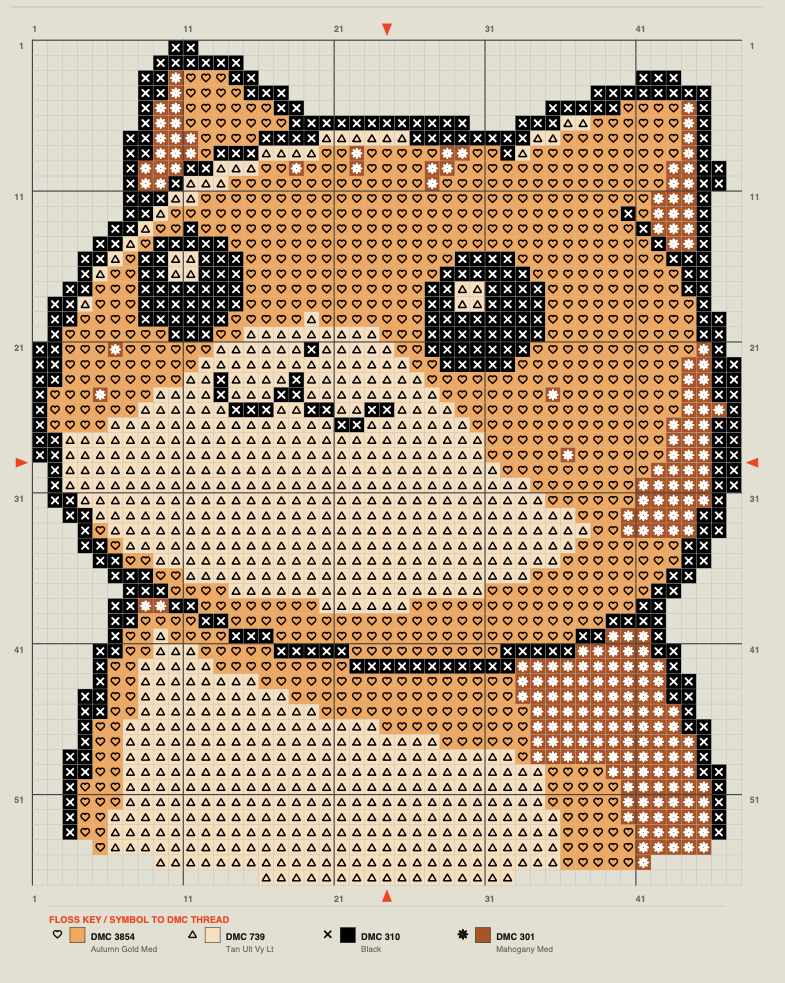
4 DMC colours · 2,179 full crosses
01THE PROCESS
How it works
in three steps
Upload.
Add a PNG, JPG, WEBP or SVG, or paste from your clipboard. High-contrast pictures work best.
Set fabric and colours.
Choose fabric count, stitch size and 1–10 DMC colours while the preview updates.
Edit and export.
Fix stray stitches, check the finished size, then download a free SVG or print-ready PDF.
02MAKE IT YOURS
Fabric counts and DMC colours you can set
Fewer colours mean a bolder chart and fewer thread changes. For sizes, read Cross-stitch fabric count and finished size.
- Aida:11, 14, 16 and 18ct
- Evenweave:25, 28, 32 and 36ct
- Size:finished and fabric cut size (with margin), in inches or millimetres
- Colours:1–10, each matched to the nearest DMC code
03THE REAL THING
A real chart made with Stitchplot
This sample uses 4 DMC colours, with centre arrows on the edges, bold lines every 10 stitches and a symbol key of DMC codes. More in What's in a Stitchplot print-ready PDF.
04TAKE IT TO THE HOOP
Free SVG or
print-ready PDF
Creating, editing and exporting an editable SVG are free in Studio. See SVG export for embroidery for what is in the file and how to use it in vector apps or cutting-machine software.
A print-ready PDF uses one credit. Google sign-in includes 3 free PDF credits, and HK$29 adds 3 more as a one-time purchase, with no subscription. It is a digital file, not a kit: you supply fabric, floss and tools. See Pricing.
05MADE FOR YOUR NEXT PROJECT
Who Stitchplot is for
Pet portraits and gifts from your own photos.
First projects with a small grid and few colours, often on 14ct. See Benefits of counted cross-stitch for beginners.
Stitchers who want a printable chart with a DMC floss key.
Makers who want an editable SVG for vector apps or cutting-machine software.
Busy or low-contrast photos need more editing, so start with a clear subject.
Do I need to install anything?
No. Stitchplot runs in your web browser, and your image is processed there too. Open Studio and add a picture to begin.
Can I turn a pet photo into a pattern?
Yes. Choose a high-contrast photo where your pet stands out clearly from the background. Expect to tidy a few stitches in edit mode before you export.
Which fabric count should I start with?
Many beginners start on 14ct Aida because the holes are easy to see and count. Check how big your chart will finish in Cross-stitch fabric count and finished size.
Is Stitchplot a subscription?
No. The SVG download is always free. Sign in with Google for 3 free PDF credits, then buy 3 more for HK$29 whenever you need them.
07KEEP EXPLORING
Guides and articles
- Meet Stitchplot Studio: a Studio tour.
- What's in a Stitchplot print-ready PDF: inside the PDF.
- Cross-stitch fabric count and finished size: size tables, 11–36ct.
- How to read a counted cross-stitch chart: symbols, centre and sections.
- Choosing DMC colours for a cross-stitch chart: how many colours to use.
- Benefits of counted cross-stitch for beginners: why small first charts help.
- SVG export for embroidery: free SVG for vector apps and cutters.
- About Stitchplot: what Stitchplot is.
08YOUR NEXT STITCH STARTS HERE
Have a photo in mind?
Start small.